

System
This chapter covers the System section of the web interface: managing user accounts and the device itself.
Users
System > Users (/system/users/) is where you create and manage the accounts that can sign in to the device. Administrators have full access, while regular users are limited to messaging features.
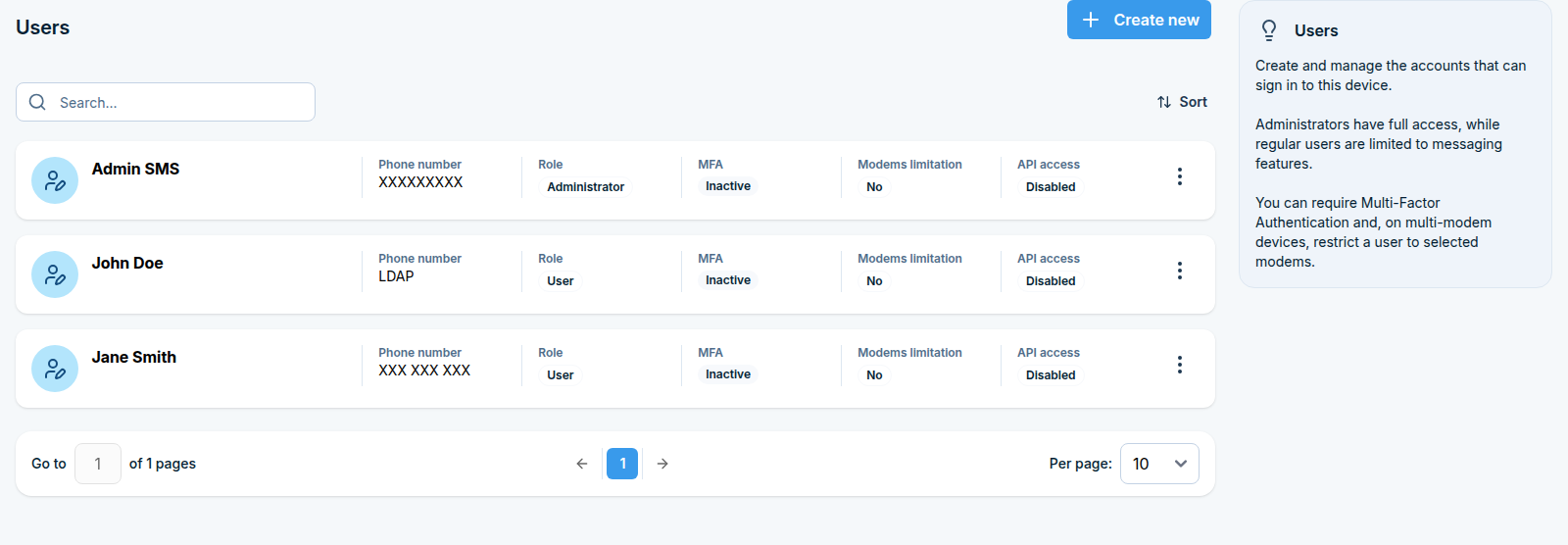
For each user you can set their Access level (Administrator or User), require Multi-Factor Authentication, and, on multi-modem devices, restrict a user to selected modems. API access (see API and Developer Integration) is also granted per user from here.
System info
System > System info (/system/info/) shows read-only information about the device and its modems:
Device type, SMSEagle software version, serial number (MAC address), modem software version, and database schema version
Disk space usage, with an optional SMS notification to the Master Admin when usage crosses a threshold you set
Per-modem details: signal strength, network name, SIM status and registration status, IMEI, and SIM card IMSI
Logs
System > Logs (/system/logs/) lets you browse and search the device’s own logs, grouped into per-modem logs and system logs (Database, System, Application, Message). Use Search by phrase to filter, or Download logs to save them for support. Logs can also be forwarded to an external syslog server for centralized collection, see Forwarding logs to an external server.
Updates
System > Updates (/system/updates/) shows the installed software version and lets you check for updates manually or automatically; you can also have the device notify the admin by SMS when a new version is available. The same page shows your technical support validity and lets you check that automatically too.
Patches
System > Patches (/system/patches/) installs a targeted fix or extra component delivered by SMSEagle support: either enter a patch code to download and install it directly, or upload a patch file (a .bin file, up to 100 MB) provided by support.
Backup / Restore
System > Backup / Restore (/system/backup/) covers both directions:
Manual backups - create a backup of the database and device settings on demand.
Automatic backups - enable scheduled backups to an SFTP/FTP(S) server, with cleanup of old backup versions.
Restore data - restore the database from a backup file.
Restart
System > Restart (/system/restart/) reboots the device on demand - sending and receiving is unavailable until it comes back online - or lets you enable a scheduled restart on a recurring basis.
Advanced
Direct database access and other power-user, off-the-beaten-path topics have their own chapter: see Advanced.